2014/11/22

LINE 插畫家限時免費!最終回「SUSHIYUKI 2」下載

DSC08634

注意囉!LINE 台灣宣布 LINE Store 上面的「個人原創貼圖」,將於 10 月 28日起 連續四週「限時免費」下載活動,每周將推出一款限免貼圖,第一坡的人氣貼圖為來自台灣的「拉比豆」作品「香菇妹&拉比豆」,第二周之後則分別來自日本、泰國等地的插畫家,最終回的「SUSHIYUKI 2」今天也正式開放下載囉 ^^

001

第四周發送的是 最終回「SUSHIYUKI 2」下載貼圖,原價 60 元,快快下載吧 ^^

002


from :: ifans 3C | 林小旭 :: :: 痞客邦 PIXNET :: 

APP Store 沒有「免費」了?字詞改為「取得」

00a2

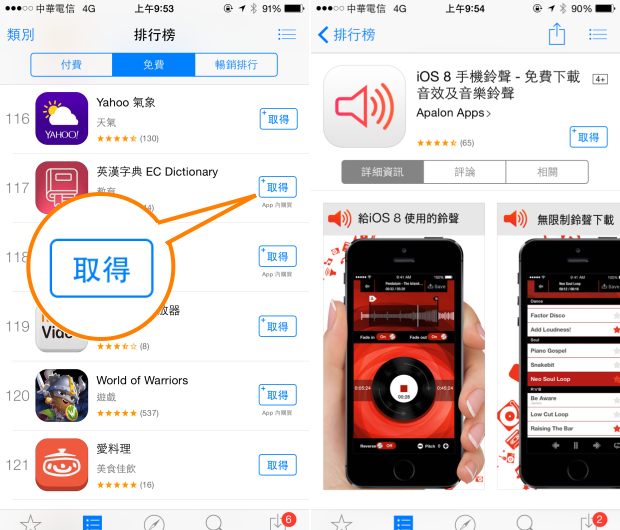
不知道使用 iPhone 與 iPad 的使用者是否發現打開 App store 時,原本的「免費」按鍵不見了?這讓不少使用者非常緊張,難道下載應用程式沒有免費了嗎?會不會點選之後變成要付費呢?其實這是蘋果近日的文字調整,世界各地也都有類似的調整!

00a3

App Store 上面的「免費」按鈕字樣改為「取得」,主要是因為受到歐盟以及聯邦貿易委員會的壓力,他們認為 App store 上面所謂的「免費」與事實不符,因為部分應用程式號稱免費下載,但 APP 裡面卻包含各種付錢的購買項目或是次數限制,這樣的標示有誤導使用者以為是免費的嫌疑,所以要求蘋果針對此部分的標示進行調整。

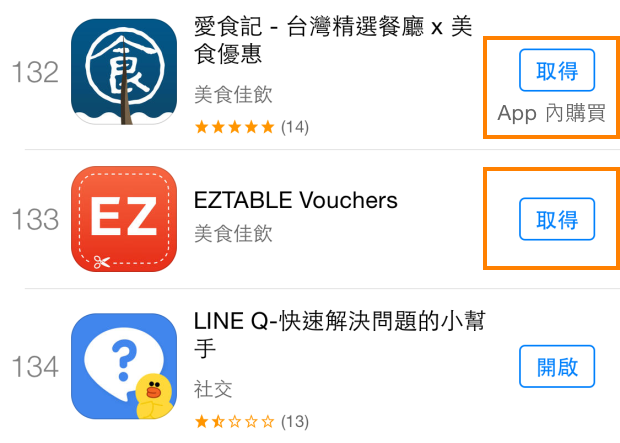
於是,原本的「免費」按鈕就變成了「取得」,如果程式內有「付費購買項目」的話,則在底下多了一句「APP 內購買」,台灣與香港都從「免費」調整為「取得」,英國與美國則是從「Free」換成「Get」,日本則是從「無料」改為「入手」,所以以後您看到"取得"就不用擔心啦,其實他就是以往那個"免費" ^^


from :: ifans 3C | 林小旭 :: :: 痞客邦 PIXNET :: 

超輕薄 iPad Air 2 與 iPad mini 3 將於 12 月初正式登台,電信資費公佈!

DSC01881.png

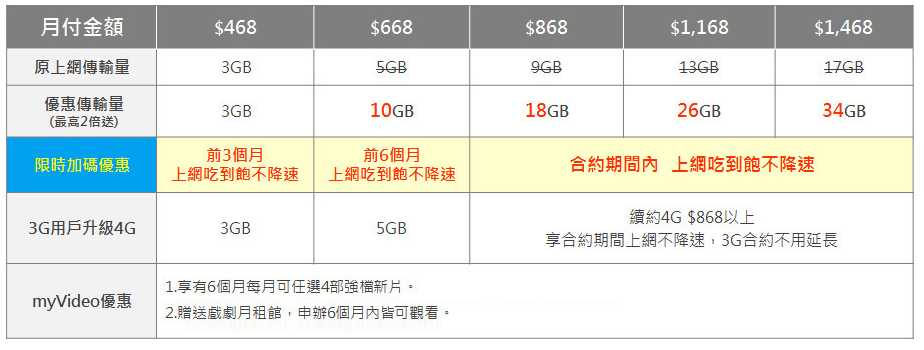
等待好一陣子的 iPad Air 2、iPad mini 3 終於要來台灣囉!十月發表、十一月通過 NCC 的審查,目前電信業者以及通路也已經摩拳擦掌,準備在 12月初迎接這兩台新款蘋果平板電腦的到來,而台灣大哥大也率先公佈電信資費,優先端出 0 元資費等優惠來讓大家輕鬆入手,即刻起就能開始進行預約!

台灣大哥大 - iPad Air 2 / iPad mini 3 適用資費 / 專案價一覽表

單獨申辦 4G 上網門號,多款傳輸費率通通加量不加價!月費 868 以及續約 4G 費率在 868 以上的用戶,在合約期內上網都提供不限流量吃到飽,並且不限速!

台灣大哥大 - iPad Air 2 / iPad mini 3 適用資費 / 專案價一覽表


from :: ifans 3C | 林小旭 :: :: 痞客邦 PIXNET ::

2014/11/21

ACDSee for iPhone:你最愛的照片編輯 App


在電腦上非常流行的知名看圖工具 ACDSee,今天 ACDSee.com Mobile 公司也推出了手機版 ACDSee for iPhone,支援 iOS 8.1 系統以上的 iPhone、iPad 和 iPod touch,軟體售價 NT$ 60 台幣。


iPhone 版 ACDSee 支援創新的拍照、影像編輯、照片拼貼功能,讓你能輕鬆的捕捉和分享照片。相機功能提供:手動控制、快門優先、自拍模式、即時濾鏡、即時調整色階、HDR 融合、閃光融合和影片模式,幾乎所專業影像編輯功能都有。


點擊下載 ACDSee for iPhone


from 愛瘋日報:最專注的蘋果媒體 

How to downgrade to iOS 8.1

Downgrade iOS 8.1 featured

If you want to jailbreak iOS 8.1, but you’re running iOS 8.1.1 or the new iOS 8.2 beta, you can downgrade your firmware to iOS 8.1 and jailbreak as long as Apple is still signing the iOS 8.1 firmware. As of this post, 8.1 is still being signed, but that will change in the future, so use this post to determine whether or not this tutorial is still valid.

If Apple is signing iOS 8.1, it’s extremely easy to downgrade your device, even if you’re running the iOS 8.2 beta or iOS 8.1.1. Neither of those firmwares are jailbreakable at the moment, but iOS 8.1 is jailbreakable, hence the need to downgrade. Follow our simple tutorial after the break to downgrade your device back to iOS 8.1.... Read the rest of this post here

from iDownloadBlog.com 

Evernote for Mac rewritten for speed and energy performance, iOS app gets Work Chat and more

Evernote 6.0 for OS X (Mac screenshot 001)

Evernote, the popular note-taking and productivity platform, on Thursday issued a major refresh to its Mac app while adding a new Work Chat for sharing and collaborating to the iPhone and iPad client, among other items.

After a complete rewrite, Evernote 6.0 for Mac is now significantly faster, more reliable and consumes less energy than ever before.

As if that weren’t enough, the new Mac app comes with half a dozen new features, including sleek new look optimized for OS X Yosemite, search improvements, the ability to resize images and tables, to mention just a few.

iOS and OS X editions of Evernote are available free of charge.... Read the rest of this post here


from iDownloadBlog.com

2014/11/20

如何更新 iPhone、iPad 和 iPod touch 系統 (韌體) 版本


如何查詢自己 iPhone、iPad 和 iPod touch 系統 (韌體) 版本?怎麼更新到最新版 iOS 系統?更新前有那些注意事項?JB 越獄後如何更新?如果更新失敗怎麼處理?iOS 有沒有辦法降級?這篇將跟大家分享 3 種更新 iOS 系統方式。


沒錯,這是一篇很基礎的 iOS 教學,如果你已經很有基礎,就不必浪費時間看這麼基礎的教學,然後酸這麼基礎誰不會。


如何更新 iPhone 系統 (韌體)


如何查詢 iOS 系統版本

更新之前,當然要先知道自己使用的是什麼系統 (韌體) 版本。只要到「設定>一般>關於本機 」裡,下方的「版本 」欄位就是你目前的系統版本,像下圖是 iOS 8.1。


如何無線更新 iOS 系統

更新 iOS 系統最簡單的方式,就是到 iPhone 的「設定>一般>軟體更新 」裡使用 Wi-Fi 網路 OTA (空中傳輸) 更新,只要點「下載並安裝 」然後「同意 」就會開始下載「安裝 」。如果你有使用密碼,則必須在安裝更新前輸入密碼。(目前僅能透過 Wi-Fi 無法使用 3/4G 網路無線更新,設定了 VPN 或代理連線可能會阻止裝置連上 iOS 更新伺服器,更新前需要暫時關閉 VPN 設定)


越獄後如何更新

一旦 JB 越獄後,就喪失了在 iPhone 上 OTA 空中傳輸更新權利,只能連接電腦使用 iTunes「更新」到最新系統。另外越獄後直接「更新」可能會失敗,所以最好先用 iTunes 和 iCloud 做好資料備份,再「回復」到最新系統,然後從備份回復資料。


空間不足無法更新

如果想在 iOS 裝置上透過 OTA 無線更新,需要有幾 G 的剩餘空間才行。假如可用空間不足,無法透過空中傳輸進行更新,可以到「設定>一般>用量>儲存空間 」裡,查詢 App 空間用量,暫時刪除不需要的 App,等更新後再重新下載已購買的 App 或內容。如果不想刪除 App 也清不出空間更新的話,只要將 iPhone 連接電腦透過 iTunes 就能更新 iOS 系統。


更新失敗無法開機

如果 iPhone 更新失敗無法回復,電腦 iTunes 抓不到裝置的話。先將 iPhone 關機,然後按住 Home 鍵不放後用 USB 線連接電腦 iTunes,在看到下圖畫面時放開 Home 鍵,就能透過「恢復模式 」來回復 iOS 裝置系統。在恢復模式中進行回復時,系統將會清除你的裝置資料。


電腦 iTunes 更新 iOS 系統

只要將 iPhone / iPad 用 USB 線跟電腦連接,然後開啟 iTunes 點擊上方的「iPhone 裝置 」,接著再點擊「更新 」就能開始自動下載更新。如果透過下載 IPSW 韌體檔來進行更新,會清空裝置上所有資料,所以手動更新前先請做好資料備份。


無法聯絡軟體更新伺服器

如果透過 iTunes 更新顯示「iTunes 無法聯絡 iPhone 軟體更新伺服器 」或「軟體更新伺服器沒有回應 」,可以試著將 iTunes 更新到最新版本,將電腦關機重新啟動後,暫時關閉電腦防毒或防火牆再更新看看。或是參考下面兩篇 Apple 官方說明:

Windows:無法連上軟體更新伺服器

OS X:軟體更新所使用的伺服器位址


iOS 有沒有辦法降級

iOS 目前無法降級到比出廠更低的系統版本,比如 iPhone 6 買來是 iOS 8.1,無法降到 iOS 8 或 iOS 7 等更低版本。只有在 Apple 剛開放新系統更新,舊版本還沒關閉驗證時,才能自己下載韌體「回復」到前一個版本系統。比如 iOS 8.1.1 剛開放更新,使用後不是很滿意的話,可以在 Apple 還沒關閉 iOS 8.1 驗證前,下載 iOS 8.1 的 IPSW 韌體降到 iOS 8.1,不過一旦 Apple 關閉驗證就回不去了。


from iPhone News 愛瘋了 

iOS 8.1.1 系統火速被駭客攻破,完美越獄


Apple 最新推出的 iOS 8.1.1 系統更新,封鎖了大陸盤古 Pangu8 越獄使用的 3 個漏洞,讓想升級 iOS 8.1.1 的越獄用戶有點卻步。不過不到一天的時間,知名駭客 iH8sn0w 就在 YouTube 上傳了一段影片,展示運行 iOS 8.1.1 系統的 iPad 3 完美越獄,並且還客製了 iOS 開機 Logo。


iH8sn0w 開發的越獄 iOS 8.1.1 系統方式,和 Bootrom 或 HFS 沒有關係,目前只能適用於 30 Pin 接口的機型 iPad 2、iPad 3 和 iPhone 4s。Apple 已經釋出 iOS 8.2 Beta 版給開發者測試,所以期待在 iOS 8.1.1 系統越獄的用戶,可能要等到 iOS 8.2 正式版開放下載才有機會。


iOS 8.1.1 封鎖 Pangu8 盤古越獄 3 個漏洞


from 愛瘋日報:最專注的蘋果媒體 

New ‘Sync Solver’ app sends Fitbit data to Apple’s Health app

iOS 8 (Health, teaser 001)

In October, Fitbit announced that it had no plans of integrating its activity trackers or software with Apple’s Health app. This means that if you have a Fitbit Flex or other device, the data it gathers will not be shared with Health, crippling its attempt to be your fitness data dashboard.

But a new app launched this week in the App Store that aims to change this. It’s called Sync Solver, and it allows Fitbit wearers to track all of the important data collected by their wearables within the Health app, without ever having to use the standalone, dedicated Fitbit application. ... Read the rest of this post here

from iDownloadBlog.com iDownloadBlog.com 

iH8sn0w shows off untethered iOS 8.1.1 jailbreak

ios 8-1-1 jailbreak

Well known iOS hacker iH8sn0w has posted a new video on his YouTube channel of an iPad 3 (J2a model) running an untethered iOS 8.1.1 jailbreak. This is significant because 8.1.1 patched 3 of the Pangu team’s exploits, effectively killing the latest jailbreak.

As usual, just because we have proof that a firmware can be jailbroken, doesn’t mean that we’re guaranteed to see a public release anytime soon. In fact, it’s worth pointing out that iH8sn0w has in the past demonstrated jailbreaks that never saw the light of day.... Read the rest of this post here


from iDownloadBlog.com iDownloadBlog.com 

2014/11/19

Rooster Teeth vs Zombiens Invades the App Store

RT vs Zombiens 3

The whole “aliens versus zombies” thing is way overrated. We all know that zombies would win. They can’t die and they turn you into one of them with just a single bite. If they were fighting aliens, well, they would turn them into “Zombiens.” Or, at least that’s what the protagonist of this game has dubbed them

Rooster Teeth vs Zombiens is a survival game starring the cast members of Rooster Teeth Studios (the guys that created the hilarious web series Red vs. Blue). If you want the RT cast to stay alive, you’d better learn how to fight.... Read the rest of this post here

from iDownloadBlog.com iDownloadBlog.com 

Apple推出iOS 8.2測試版和Apple Watch開發工具


美國 Apple 公司今天為開發者推出 iOS 8.2 Beta 測試版,和包含 WatchKit 的 Xcode 6.2 測試版開發工具,讓開發者能為即將上市的 Apple Watch 開發應用程式。WatchKit SDK 裡透露兩款 Apple Watch 不同的螢幕解析度:小尺寸 38 毫米 Apple Watch 的螢幕解析度為 272 x 340,而大尺寸的 42 毫米 Apple Watch 螢幕解析度為 312 x 390。

為了提升 Apple Watch 的文字易讀性,Apple 還為小尺寸的 Apple Watch 推出新字體 San Francisco。開發者使用 WatchKit 可以用來建立 Glances 和可操作式通知,將來可為 Apple Watch 開發原生應用。

Apple Watch 無疑是目前最好的智慧手錶,但,還不夠好


from 愛瘋日報:最專注的蘋果媒體 

‘Everest’ lets you control the Music app and Spotify using banner notifications

Everest Screen

Everest is a recently released jailbreak tweak that allows you to control your music via banner notifications invoked by an Activator gesture. Along with the stock Music app, you can use Everest to control music from Spotify.

If you’re looking for an alternative to controlling your music with Control Center, then Everest is a legitimate option. Have a look at our video walkthrough inside to see what I mean.... Read the rest of this post here


from iDownloadBlog.com iDownloadBlog.com 

Apple keeping Arizona plant despite GT Advanced bankruptcy

GT Advanced (furnaces, Pocketnow 001)

Apple plans to keep the sapphire production factory it built with GT Advanced in Mesa, Arizona, according to a report from Bloomberg. The outlet says the company has told officials that it’s committed to bringing jobs and manufacturing to the area, despite GT’s bankruptcy.

“They’ve indicated their commitment to us: They want to repurpose that building and use it again,” Mesa City Manager Christopher Brady told Bloomberg. “Apple is focused on preserving jobs and promised to “work with state and local officials as we consider our next steps.”... Read the rest of this post here

from iDownloadBlog.com iDownloadBlog.com

Apple Watch resolutions and other interesting tidbits disclosed in developer tools

Apple Watch (Watchkit teaser 001)

Apple has left many questions unanswered regarding its upcoming smartwatch following its September unveiling. Representing a brand new form factor for iOS, the fashionable wrist-worn accessory sports a Retina panel which Apple bills as an “incredibly high pixel density” screen laminated to a machined and polished single crystal of sapphire (strengthened Ion-X glass on the Sport collection).

With today’s release of the official Apple Watch software development kit (SDK), watchful third-party developers have scanned the files in search of interesting tidbits and discovered references to pixel resolutions for both the 38mm and 42mm high Apple Watches, in addition to other previously unknown details worth mentioning.... Read the rest of this post here

from iDownloadBlog.com iDownloadBlog.com