2014/11/27

Fantastical is on sale: get up to 65% off this great app

Fantastical 2.1

Flexibits just announced that is is having a pretty big sale on Fantastical for iPhone, iPad and Mac, as well as on Chatology for Mac. Discounted by up to 65%, Fantastical is an award winning calendar application that has routinely been ranked as one of the best calendar apps on iDB.... Read the rest of this post here


from iDownloadBlog.com 

WatchBoard: a new Apple Watch SpringBoard replacement for iPhone and iPad

WatchBoard Featured

Aaron Ash, the creator of the legendary jailbreak tweak called Barrel, is back with a brand new creation called WatchBoard. WatchBoard is based off of the Apple Watch UI, and it’s the best implementation of said concept that I’ve seen thus far.

Ash’s expertise in this area is immediately apparent when it comes to design decisions, settings, etc. Not only that, but the tweak works on both the iPhone and the iPad. Have a look at our video walkthrough of WatchBoard after the break to see what makes it so good.... Read the rest of this post here

from iDownloadBlog.com

Screeny quickly deletes old screenshots from your Camera Roll

Screeny

If you find yourself filling up your iPhone with screenshots and wasting storage space, then you might be interested in this new app called Screeny. Screeny does one thing, and it does it well: it scans your Camera Roll for screenshots and lets you delete them in one fell swoop, saving you the time to manually browse through your entire library, and most importantly, helping you save precious storage space on your device.... Read the rest of this post here


from iDownloadBlog.com

Good deal: 41% off this remote control mini drone

mini drone

Folks looking to pick up something different this holiday season for that special someone, or even themselves, may want to check out the SKEYE Nano Drone. The remote control quadcopter is small enough that it can be flown almost anywhere, and right now deal site StackSocial is offering it at a steep discount.

Drones have become increasingly popular in recent years, and are guaranteed to be a hot-ticket item this holiday season. The SKEYE differs itself from the rest of the pack with its size and agility. It measures just 1.57×1.57 inches and utilizes a 6-axis flight control System, making it perfect for performing stunts.... Read the rest of this post here


from iDownloadBlog.com 

2014/11/26

WinterBoard updated for iOS 8

Winterboard theme

Themers rejoice as WinterBoard has been updated to support new features of iOS 8. Clocking at version 0.9.3916, this new version of WinterBoard adds a few features geared towards iOS 7, as well as some features for users that are still on iOS 7.

Besides the many updates that can be found under the hood, the most obvious change users will notice right away is that WinterBoard isn’t a standalone app anymore, and all changes will have to be made directly from the dedicated panel in the Settings app.... Read the rest of this post here


from iDownloadBlog.com

Weather Or Not provides weather forecast for your upcoming calendar events

Weather Or Not 3

When the weather gets colder, I get grouchier. Even though the crisp autumn air clears the city of pollen and reminds me that the holidays are just around the corner, I still find myself wanting to hide out under a warm blanket for the next four months.

Weather Or Not is a weather app that connects to your calendar to tell you just how cold (or warm) it will be right during events, so you can plan your winter garb accordingly. No more showing up at picnics without an umbrella. Plus, the iOS 8 extension gives you the forecast at a glance.... Read the rest of this post here


from iDownloadBlog.com

UnlimTones - 不用電腦輕鬆為 iPhone 換上喜歡鈴聲


iPhone 新手最常問的問題,如果「鈴聲 」說第二,應該沒有其他問題敢說第一。雖然透過電腦 iTunes 或 APP 都能輕鬆製作自己喜歡的 iPhone 鈴聲,但有些用戶還是希望能不透過電腦同步,就能為 iPhone 換上個性鈴聲。因此這篇跟瘋友們分享二種不需要透過電腦,就能為 iPhone 換上自製鈴聲方式。另外再整理多種鈴聲製作方案供大家選擇,讓你 iPhone 換鈴聲一次就上手。


不用電腦如何為 iPhone 換鈴聲


1. 如果 iOS 8 內建的 50 種以上鈴聲你都不喜歡的話,到「設定>聲音>鈴聲 」裡,點擊右上角的「商店 」,就能到 iTunes Store 裡付費購買鈴聲。


2. 在 iTunes 商店的「鈴聲」專區裡,能從「排行榜」或「類型」尋找自己喜歡的鈴聲,也能在下方透過輸入關鍵字快速「搜尋」。台灣一首鈴聲都是 NT$30 塊,長度 30 秒。在鈴聲介紹頁面裡點擊左邊的歌曲名稱,就能播放鈴聲來試聽,喜歡再點右邊的價錢購買。


iOS 8.1.1 鈴聲不見問題

目前在 iOS 8.1.1 有些使用者反應購買的鈴聲會消失,蘋果客服人員已經在處理,iOS 8.1 之前沒有這個問題。如果使用 iOS 8.1.1 想在 iTunes 購買鈴聲可以先等一等,iOS 8.2 已經在測試即將推出,或是改用 APP 或是電腦 iTunes 來製作鈴聲。


越獄後如何為 iPhone 換鈴聲


1. iPhone JB 越獄後到 Cydia 的 BigBoss 內建源裡搜尋「UnlimTones 」,作者是 UnlimApps。這是一款免費但是會跳出廣告的鈴聲製作軟體,安裝後需要重新啟動 iPhone 主畫面。


2. 操作上和 iTunes 商店沒什麼不同,找到喜歡的鈴聲後都可以「試聽」和「下載」,差別只是 UnlimTones 免費但常常會跳出廣告,要小心點擊「X」關閉。


3. 如果 UnlimTones 上都找不到喜歡鈴聲的話,它也有提供自製鈴聲功能。只要在首頁下方選擇「Make Ringtone 」,就能從自己的 iPod 音樂庫或網路下載製作。


4. 目前 UnlimTones 在 iOS 8 暫時無法用中文鍵盤輸入,如果想打中文搜尋鈴聲的話,只能暫時在其他像備忘錄、Safari 等地方打中文,然後用複製、貼上 UnlimTones 搜尋框的方式。


有 JB 越獄的話,也能使用 i-FunBox 或 iTools,將準備好的「*.m4r 」鈴聲檔案,直接複製到鈴聲 (Ringtones) 資料夾裡就能使用。


如果想幫 iPhone 換上自製鈴聲,但又不想透過電腦 iTunes 同步的話,目前就是上面兩種方式。沒越獄到 iTunes 商店付費下載,但目前在 iOS 8.1.1 會有鈴聲消失問題,另外也能使用 GarageBand 製作 iPhone 鈴聲。JB 越獄後到 Cydia 安裝「UnlimTones」,也能換上喜歡的鈴聲不需要透過電腦 iTunes。


希望這是我寫的最後一篇有關 iPhone 鈴聲文章^^


from iPhone News 愛瘋了

WiFried: a new tweak to fix iOS 8’s Wi-Fi performance issues

WiFried Cydia

Developer Mario Ciabarra, best known for his work on big Intelliborn tweaks like MyWi and My3G, is back with a brand new tweak that claims to do some great things for people experiencing Wi-Fi issues on iOS 8. WiFried is the name of his new tweak, and its purpose is to fix the persistent Wi-Fi issues that occur for a lot of iOS 8 users. That sounds good and all, but the question is, will it work?... Read the rest of this post here


from iDownloadBlog.com

2014/11/25

Crimson Keyboard offers predictive typing without that annoying suggestion bar

Crimson Keyboard3

When I first switched over to iOS 8, I found that the predictive typing function, while helpful, was a bit distracting, almost to the point of being annoying. I eventually turned it off.

Crimson Keyboard offers a personalized predictive typing function, but instead of the suggestion bar, words are displayed just above keys. Plus, instead of autocorrecting your misspelled words (and sometimes leading to hilarious miss-typed text messages), you will see suggested corrections in red.... Read the rest of this post here

from iDownloadBlog.com 

iPhone 6 最新廣告影片:工作、娛樂兩相宜


Huge 和 Cameras 兩支豈止於大 iPhone 6 廣告影片後,今天美國 Apple 公司又推出了「Gamers」和「Reservations」兩支影片,介紹 iPhone 6 在遊戲性能和 Continuity 接續互通功能,一樣是由 Justin Timberlake 和 Jimmy Fallon 配音。


在「Gamers」影片中強調 iPhone 6 的第二代 64 位元 A8 晶片在遊戲方面性能,最新遊戲方面 Metal 技術,能充分發揮 A8 晶片的繪圖效能與 iOS 8 新功能,iPhone 6 能媲美遊戲機。「Reservations」強調 iOS 8 的 Continuity 接續互通功能,透過 iCloud 能在任何 Apple 裝置上撥打 iPhone 電話,iPhone、iPad 和 Mac 被賦予極佳的互相合作能力,iPhone 6 比你想像的更強大。


from 愛瘋日報:最專注的蘋果媒體 

2014/11/24

Music Center lets you view your entire music library from Notification Center

Music Center

If you’ve ever wanted to be able to browse your entire music library from Notification Center, then you should check out Music Center in the App Store. Developed by jailbreak alumni Akhil Tolani, Music Center is a great idea that is unfortunately handicapped by Apple’s restrictions on what you can do with Notification Center extensions.... Read the rest of this post here


from iDownloadBlog.com 

2014/11/22

LINE 插畫家限時免費!最終回「SUSHIYUKI 2」下載

DSC08634

注意囉!LINE 台灣宣布 LINE Store 上面的「個人原創貼圖」,將於 10 月 28日起 連續四週「限時免費」下載活動,每周將推出一款限免貼圖,第一坡的人氣貼圖為來自台灣的「拉比豆」作品「香菇妹&拉比豆」,第二周之後則分別來自日本、泰國等地的插畫家,最終回的「SUSHIYUKI 2」今天也正式開放下載囉 ^^

001

第四周發送的是 最終回「SUSHIYUKI 2」下載貼圖,原價 60 元,快快下載吧 ^^

002


from :: ifans 3C | 林小旭 :: :: 痞客邦 PIXNET :: 

APP Store 沒有「免費」了?字詞改為「取得」

00a2

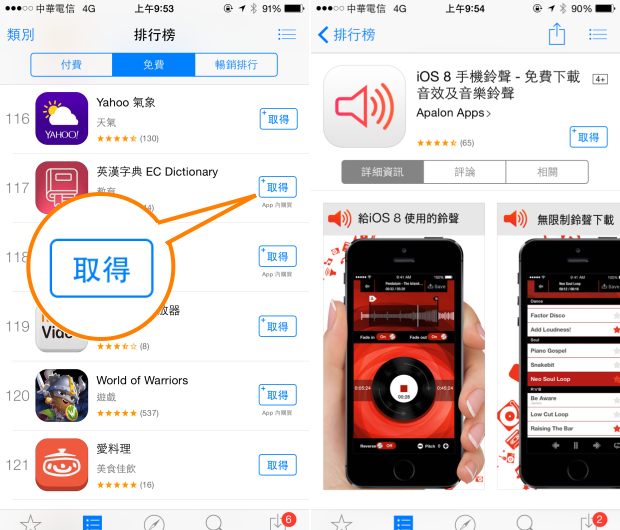
不知道使用 iPhone 與 iPad 的使用者是否發現打開 App store 時,原本的「免費」按鍵不見了?這讓不少使用者非常緊張,難道下載應用程式沒有免費了嗎?會不會點選之後變成要付費呢?其實這是蘋果近日的文字調整,世界各地也都有類似的調整!

00a3

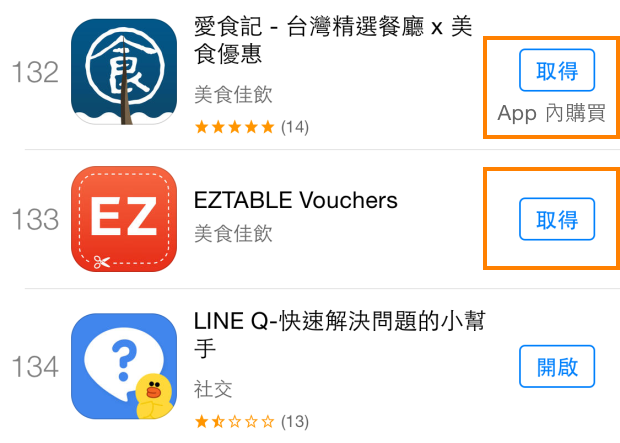
App Store 上面的「免費」按鈕字樣改為「取得」,主要是因為受到歐盟以及聯邦貿易委員會的壓力,他們認為 App store 上面所謂的「免費」與事實不符,因為部分應用程式號稱免費下載,但 APP 裡面卻包含各種付錢的購買項目或是次數限制,這樣的標示有誤導使用者以為是免費的嫌疑,所以要求蘋果針對此部分的標示進行調整。

於是,原本的「免費」按鈕就變成了「取得」,如果程式內有「付費購買項目」的話,則在底下多了一句「APP 內購買」,台灣與香港都從「免費」調整為「取得」,英國與美國則是從「Free」換成「Get」,日本則是從「無料」改為「入手」,所以以後您看到"取得"就不用擔心啦,其實他就是以往那個"免費" ^^


from :: ifans 3C | 林小旭 :: :: 痞客邦 PIXNET :: 

超輕薄 iPad Air 2 與 iPad mini 3 將於 12 月初正式登台,電信資費公佈!

DSC01881.png

等待好一陣子的 iPad Air 2、iPad mini 3 終於要來台灣囉!十月發表、十一月通過 NCC 的審查,目前電信業者以及通路也已經摩拳擦掌,準備在 12月初迎接這兩台新款蘋果平板電腦的到來,而台灣大哥大也率先公佈電信資費,優先端出 0 元資費等優惠來讓大家輕鬆入手,即刻起就能開始進行預約!

台灣大哥大 - iPad Air 2 / iPad mini 3 適用資費 / 專案價一覽表

單獨申辦 4G 上網門號,多款傳輸費率通通加量不加價!月費 868 以及續約 4G 費率在 868 以上的用戶,在合約期內上網都提供不限流量吃到飽,並且不限速!

台灣大哥大 - iPad Air 2 / iPad mini 3 適用資費 / 專案價一覽表


from :: ifans 3C | 林小旭 :: :: 痞客邦 PIXNET ::

2014/11/21

ACDSee for iPhone:你最愛的照片編輯 App


在電腦上非常流行的知名看圖工具 ACDSee,今天 ACDSee.com Mobile 公司也推出了手機版 ACDSee for iPhone,支援 iOS 8.1 系統以上的 iPhone、iPad 和 iPod touch,軟體售價 NT$ 60 台幣。


iPhone 版 ACDSee 支援創新的拍照、影像編輯、照片拼貼功能,讓你能輕鬆的捕捉和分享照片。相機功能提供:手動控制、快門優先、自拍模式、即時濾鏡、即時調整色階、HDR 融合、閃光融合和影片模式,幾乎所專業影像編輯功能都有。


點擊下載 ACDSee for iPhone


from 愛瘋日報:最專注的蘋果媒體